Dots and Spots Layered Pattern Creator: A Practical Resource for Custom Pattern Design
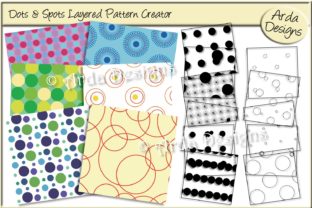
The Dots and Spots Layered Pattern Creator is a specialized digital asset pack designed for designers, illustrators, textile artists, and print professionals who need precise, high-resolution, and highly customizable pattern foundations. Unlike generative tools or one-click pattern makers, it delivers a curated library of layered elements—262 solid layers and 262 grunged layers—each sized to 3600px (12×12 inches at 300dpi) and organized in a single, well-structured PSD file containing all grunged variants. Its core value lies not in automation, but in control: the ability to manually combine, reorder, mask, recolor, and blend discrete visual components to build patterns with intentional texture, rhythm, and depth.
What Sets It Apart From Other Pattern Resources
Most pattern resources fall into one of three categories: pre-made seamless tiles, algorithm-driven generators, or vector-based swatch libraries. The Dots and Spots Layered Pattern Creator occupies a distinct middle ground. It doesn’t generate patterns on demand—it provides raw, production-ready ingredients that retain full layer integrity in Photoshop. This means no flattening, no baked-in blending modes, and no loss of editability. Each dot, spot, cluster, or scatter element lives on its own layer, allowing for non-destructive experimentation: adjusting opacity, applying layer masks, changing blend modes, or selectively erasing parts without affecting adjacent elements.
Compared to vector pattern swatches, this approach prioritizes organic texture and tactile nuance over geometric precision. The grunged layers, for example, include subtle noise, edge wear, ink bleed, and tonal variation—details difficult to replicate convincingly with vectors alone. And unlike many tile-based PNG packs, every layer is built to a consistent physical dimension (12×12 inches at 300dpi), making scaling and print integration predictable across projects—from fabric repeats to packaging mockups to editorial backgrounds.
Strengths in Real-World Use Cases
The Dots and Spots Layered Pattern Creator excels where flexibility and fidelity matter more than speed. Consider a surface designer developing a limited-run textile collection: they may start with a base grid of evenly spaced solid dots, then overlay scattered grunged spots to introduce irregularity and visual weight. By toggling visibility, adjusting layer order, or using clipping masks to confine texture to specific shapes, they maintain full creative agency throughout the process.
Similarly, a branding designer building a custom presentation template might use solid layers as structural anchors—aligning them to a grid for clean, modern rhythm—then soften the composition with selective grunged overlays applied only to background elements. Because all layers are resolution-matched and named consistently, swapping between variations (e.g., switching from tight clusters to loose scatter) takes seconds—not hours of resizing or re-rasterizing.
Another practical strength is consistency across deliverables. Since all layers share identical dimensions and resolution, outputting for web (72dpi), print (300dpi), or large-format display (scaled proportionally) requires minimal recalibration. There’s no guesswork about whether a “small dot” layer will pixelate when enlarged or appear overly coarse at screen resolution.
Tradeoffs and Situational Limitations
This level of control comes with expectations. The Dots and Spots Layered Pattern Creator assumes familiarity with Photoshop layer workflows—including layer groups, blend modes, masks, and smart objects. It is not optimized for beginners learning design software, nor for users who prefer drag-and-drop simplicity. If your workflow relies heavily on Figma, Affinity Designer, or Procreate, native compatibility is limited—you’ll need to export flattened versions or adapt layers manually.
It also doesn’t include color palettes, naming conventions for commercial licensing, or built-in repeat logic. While the layers are sized for seamless tiling, achieving true seamlessness still requires manual alignment, offset testing, and edge refinement—skills the resource supports but doesn’t automate. For time-sensitive client work where rapid iteration is critical, some users may find starting from scratch faster than curating from 524 layers—even with thoughtful organization.
Additionally, while the grunged layers add valuable texture, they’re intentionally subtle—not distressed, not heavily weathered, and not stylized toward any single aesthetic (e.g., vintage, industrial, or minimalist). That neutrality is a strength for versatility, but a limitation if you require bold, signature textures out of the box.
When It Fits—and When It Doesn’t
The Dots and Spots Layered Pattern Creator is most valuable when you prioritize repeatability, tactile authenticity, and granular control over pattern composition. It suits professionals working on projects where subtle variation matters: apparel prints with nuanced scale shifts, stationery with layered depth, or packaging where dot density affects perceived luxury or playfulness.
It’s less suited for users whose primary need is instant variety—such as social media designers generating dozens of background options per hour—or those needing cross-platform assets (SVG, PDF, or Lottie files). Likewise, educators building beginner-friendly lesson plans may find the layer count overwhelming without supplemental guidance on organization and workflow efficiency.
For teams standardizing design systems, the uniform sizing and naming convention offer real advantages. You can build internal libraries, create reusable layer group templates, or develop style guides around specific combinations—knowing every contributor starts from the same calibrated foundation.
Comparing With Broader Alternatives
When evaluating alternatives, consider your workflow stage and output goals. If you’re exploring pattern *concepts*, sketching by hand or using quick digital brushes may be faster. If you need *production-ready tiles* for immediate upload to print-on-demand platforms, a set of pre-tested seamless PNGs may reduce QA time. If your focus is *generative exploration*, parametric tools allow real-time adjustment of spacing, size variance, and randomness—but often sacrifice fine-grained textural control.
The Dots and Spots Layered Pattern Creator bridges gaps between those approaches. It’s not conceptual, not automated, and not final-output ready—but it’s deliberately engineered to support the middle phase: the iterative, hands-on refinement where decisions about balance, contrast, and hierarchy are made visually and intuitively.
Practical Tips for Getting Started
To make the most of the Dots and Spots Layered Pattern Creator, begin by organizing layers before designing. Use Photoshop’s layer grouping and color labels to separate solid vs. grunged variants, or categorize by scale (micro, medium, macro). Duplicate the base PSD rather than editing the original—this preserves the clean starting point for future projects.
Start simple: pick three solid layers and one grunged layer. Apply different blend modes (Multiply, Overlay, Soft Light) to see how texture interacts with underlying structure. Then try masking part of a grunged layer to affect only selected dots—not the entire composition. These small experiments reveal how much expressive range the system offers without requiring complex setups.
Finally, test at actual output size early. Zoom to 100% and view layers as they’ll appear printed at 12×12 inches. What looks balanced on screen may feel sparse or crowded in physical form—especially with fine dots or low-contrast grunge. Adjusting layer opacity or scaling individual elements *in context* leads to more reliable results.
A Resource That Supports Judgment, Not Replaces It
At its core, the Dots and Spots Layered Pattern Creator functions like a well-stocked physical studio—complete with calibrated tools, consistent materials, and room for personal technique. It doesn’t promise faster results, but it does remove common friction points: mismatched resolutions, inconsistent sizing, flattened textures, or unpredictable scaling behavior. Whether you’re refining a single repeat for a capsule collection or building a library of signature backgrounds for client work, it gives you grounded, editable elements—not just inspiration, but infrastructure.
That makes it especially useful for practitioners who’ve moved past tutorial dependency and now seek resources that respect their judgment, support their process, and scale with their standards—not just their deadlines.