Fashion Vector Pattern with Pink Roses
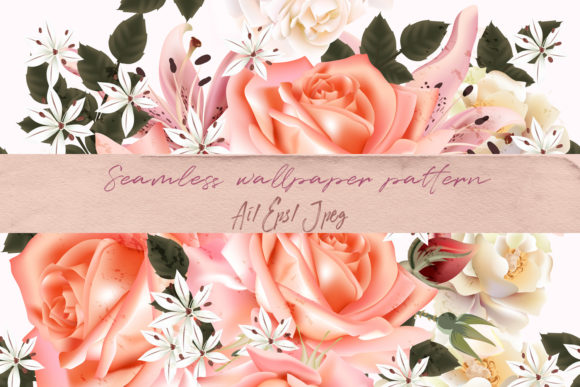
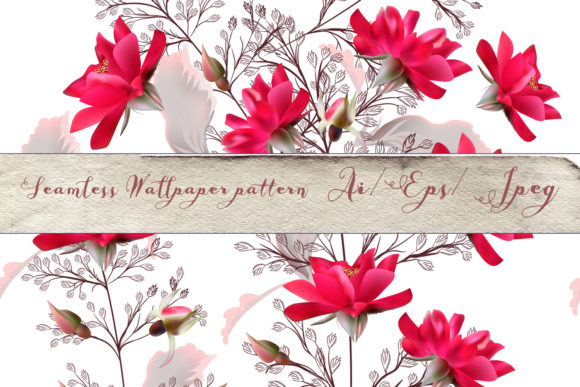
A Fashion Vector Pattern with Pink Roses is more than decorative—it’s a precision-crafted, scalable asset built for real-world creative execution. Designed in classic style with botanical elegance, this seamless wallpaper pattern features hand-drawn pink and red roses arranged with balanced rhythm and refined spacing. Every petal, leaf, and stem was drawn deliberately—not generated or traced—preserving organic warmth while meeting technical standards for professional use. Because it’s delivered in native vector formats (AI CS2 and EPS10), the pattern scales infinitely without pixelation, distortion, or loss of detail. That means it performs equally well on a business card and a 20-foot event backdrop.
Where This Pattern Fits in Your Creative Workflow
This isn’t an isolated graphic—it integrates at multiple points across design, production, and delivery. Before launching a project, it serves as a foundational visual anchor: choose it early to guide color palettes, typography pairings, and material selections. During execution, it becomes a functional layer—applied directly to mockups, embedded into layout templates, or tiled across textile swatches. After finalization, it supports consistency: reused across invitations, signage, packaging, and digital assets to reinforce brand tone or event identity without visual fatigue.
For example, a wedding planner selecting stationery might start by testing this pattern against envelope sizes and ink coverage limits. A fabric designer could import the AI file into Adobe Illustrator, isolate individual rose clusters, and rearrange them to match garment seam lines. A small-batch candle maker may apply the JPEG preview to product labels first—then upgrade to vector when ordering foil-stamped boxes—ensuring crisp edges at every stage.
Compatibility and Format Considerations
The included files are purpose-built for interoperability. The AI CS2 file opens natively in Illustrator versions from CS2 through CC 2024, allowing full editing access: recoloring stems, adjusting spacing, or extracting single elements for custom compositions. The EPS10 file ensures backward compatibility with older design suites and broad support in print prepress environments—especially important when handing off to commercial printers who require industry-standard vector deliverables. The JPEG preview (5000×5000 px) isn’t just for browsing; it’s a high-res reference for quick placement in InDesign layouts, Canva presentations, or client PDFs where vector embedding isn’t possible.
None of the files include embedded fonts, raster effects, or linked assets—so there’s no risk of missing elements or broken links during handoff. All paths are outlined, layers are named logically (“roses,” “leaves,” “background”), and the tile repeat is mathematically precise—no manual alignment needed. That saves time during prep and reduces quality-control checks later.
Practical Implementation Across Use Cases
Wallpaper & Interior Design: Import the AI file into your wallcovering software or share the EPS with a manufacturer. Because the pattern is truly seamless—tested at 300% zoom—the repeat edge matches perfectly across panels, eliminating visible seams in large-scale installations. Test tile size first: scale the pattern to 12–18 inches wide per repeat for residential spaces; go larger (24+ inches) for hospitality or retail walls where visual impact matters more than intimacy.
Fabric & Textile Production: When sourcing printed cotton or linen, provide the EPS file directly to your mill. Most digital textile printers accept EPS natively and will honor stroke weights and subtle gradients within the hand-drawn line work. If you’re screen-printing, isolate each rose group and convert strokes to outlines—this prevents thin lines from disappearing during halftone separation.
Cards & Stationery: Use the vector file to create die-cut shapes—like a rose-shaped invitation border—or apply a clipping mask over photos for elegant photo cards. For letterpress, simplify fill areas to solid colors only (avoid gradients) and confirm minimum line weight (0.25 pt) with your printer beforehand. The JPEG preview works well for email proofs or social media announcements before final print runs.
Digital Marketing & Social Assets: Scale the pattern to fit Instagram Story dimensions (1080×1920 px) or LinkedIn banner size (1584×396 px) without resampling. Overlay light text using a semi-transparent white box for readability—avoid placing dark type directly over dense rose clusters. For animated posts, export individual rose elements as SVGs and stagger their entrance in After Effects or CapCut.
Long-Term Usability and Quality Control
Because this Fashion Vector Pattern with Pink Roses is hand-drawn—not algorithmically generated—it holds up under repeated use. Unlike AI-generated patterns that often rely on repetitive micro-variations, this one includes intentional asymmetry: some roses face left, others tilt slightly upward, leaves curl at natural angles. That subtlety prevents visual monotony when tiled across large surfaces or used across multiple projects over time.
To maintain consistency across teams or clients, store the AI file in a shared cloud folder with clear naming: “Fashion_Vector_PinkRoses_v2_AI_CS2.ai”. Keep a versioned changelog if you make edits—e.g., “v2: removed background grid, adjusted stem curvature.” When sharing with vendors, always send the EPS unless they specifically request AI—this avoids accidental edits to your master file.
For quality control, test the pattern at three scales: 10%, 100%, and 500%. At 10%, check for unintended gaps or overlaps in the tile boundary. At 100%, verify that fine details (veins on leaves, petal edges) remain legible. At 500%, confirm no stray anchor points or hidden layers disrupt clean scaling. If exporting for web, save SVGs with “responsive” enabled—not fixed pixel dimensions—so the pattern adapts fluidly across devices.
Integration With Other Tools and Resources
This pattern doesn’t exist in isolation. Pair it with Pantone Solid Coated swatches to lock in rose-pink (#EA7BBB) and deep burgundy (#7A1E2C) for physical prints. Use it alongside free serif fonts like Cormorant Garamond or Playfair Display for invitations—both have enough contrast and elegance to complement the floral detail without competing. In Adobe Creative Cloud Libraries, save individual roses as reusable assets so they appear in Photoshop, XD, and Illustrator libraries simultaneously.
If you’re building a brand system, treat this pattern as a “texture layer”—not the primary logo or wordmark. Apply it behind headlines in presentations, as a subtle overlay on hero images, or as a border element in reports. Its classic styling bridges traditional and modern aesthetics, making it adaptable for luxury skincare brands, boutique hotels, academic conferences, or artisanal food packaging—where authenticity and craftsmanship matter more than trend-chasing.
Creating this illustration was a work of joy—and that intention translates into usability. You’re not licensing a generic clipart rose. You’re adopting a carefully considered, technically sound, and aesthetically cohesive element that fits where it’s needed, performs where it’s placed, and endures where it’s applied. If you need assistance adapting it for a specific platform, format, or output requirement, reach out directly. Happy creating.